
Reviews
Sliding Route Logic offers a peaceful yet engaging puzzle experience. The core mechanic of sliding tiles to clear a path is simple to understand but provides plenty of depth as levels progress. The lack of timers removes any sense of urgency, allowing players to think through each move. The minimal visuals and soft sounds create a soothing atmosphere perfect for unwinding. This game is an excellent pick for anyone who enjoys thoughtful challenges without stress.
Description
Core Puzzle Concept
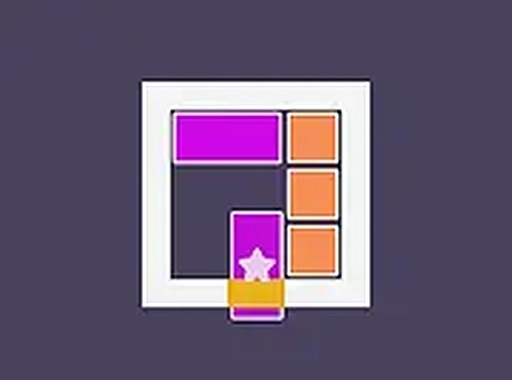
Sliding Route Logic presents a clean board filled with movable tiles. The player's task is to rearrange these tiles by sliding them into empty spaces, gradually forming a clear route for a special tile marked with a star. This star tile must travel from its starting position to a designated exit point on the board. Each move is counted, encouraging deliberate planning rather than random shifting. The game does not use timers, so there is no pressure to act quickly. This design makes the experience suitable for players who prefer to think through each step carefully.
Level Progression
The puzzles start with simple layouts that have few tiles and obvious solutions. As players advance, the boards become larger and the tile arrangements more complex. Later levels require multiple steps and forward thinking to solve. The difficulty increases gradually, allowing players to build their problem-solving skills over time. Each new level feels like a fresh challenge without becoming frustrating. The progression system rewards patience and logical thinking, not speed or reflexes.
Visual and Audio Atmosphere
The game uses a minimal visual style with soft colors and simple shapes. The interface is uncluttered, with only the board and a few control buttons visible. Gentle sound effects accompany tile movements, adding to the calm atmosphere. The overall presentation is designed to help players focus on the logic puzzle without distractions. This clean aesthetic makes the game suitable for short breaks or longer relaxation sessions.
Accessibility and Platform
Sliding Route Logic runs entirely in a web browser, so no downloads or installations are needed. It works on both desktop computers and mobile devices, adapting to different screen sizes. A full screen mode is available for a more immersive view. The controls are simple: clicking or tapping tiles that have an adjacent empty space will move them. The game also includes a restart option for levels where progress becomes blocked. These features make the puzzle accessible to a wide audience, from young children to older adults.







03 Comments
Sign in to comment
You must be logged in before posting a review or rating.
No account? Create one
No comments yet. Be the first to comment!